
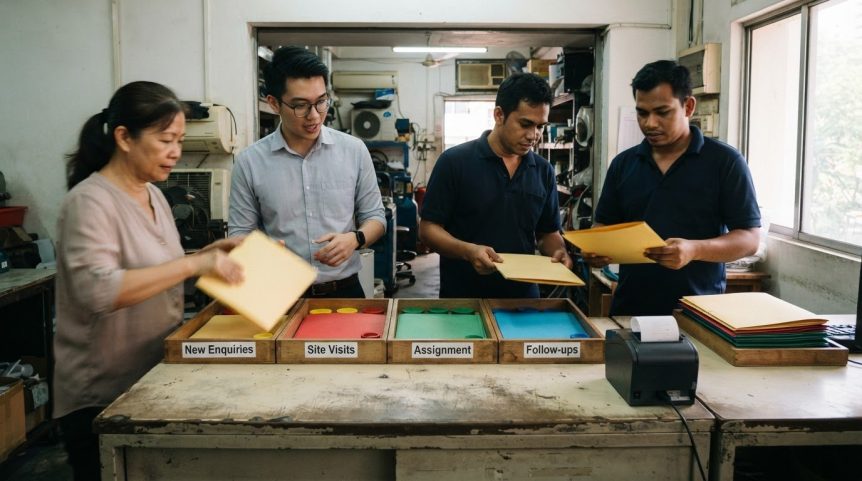
The cheapest CRM can be the wrong choice if it lacks features your team needs. Choosing a CRM for a small business starts with matching the system to your team’s size, essential workflows and growth plans.
When customer details are spread across spreadsheets, inboxes and separate tools, follow-ups and sales history are easy to lose track of. A CRM can bring that information together, but only if your team uses it consistently and it works with the systems you already rely on.
This guide helps you weigh pricing, automation, customer data and integrations against your business needs. You’ll see what to prioritise for a smaller team, which features may matter as you grow, and how to build a practical shortlist without paying for complexity you won’t use.
Key Takeaways
- Compare the full cost of a CRM, including implementation, data migration, integrations and training, rather than judging plans by licence fees alone.
- Map repetitive tasks and lead hand-offs before selecting automation, so the system supports the way your team actually works.
- Decide which customer interactions need to be captured and how your team will keep records useful and consistent.
- Prioritise connections to the tools your business already relies on, especially accounting software, email and WhatsApp.
- Choose a system that suits your current team while leaving room to grow, and assess options against the same practical business needs.
1. CRM pricing and accounting software integration
That estimate multiplies the per-user range by 20; it excludes implementation, data migration, training and integrations. A free plan may reduce initial spending, but its user limits or missing features could make it unsuitable as the team grows.
Free options work best when your team needs basic contact records and a sales pipeline. Before committing, compare each plan’s user allowance, storage, reporting, automation and accounting connections. A free tier without a required integration may create manual work or force an upgrade. Many CRM products offer free trials, so your team can test everyday tasks before paying.
To assess a trial, add sample contacts, create a deal, assign a follow-up and review the account record. If the trial allows it, connect a test accounting workflow too. Note which steps require manual entry and what information syncs between systems. This test shows whether the software supports your process, not just whether its feature list looks impressive.
What are the risks and limitations of using a CRM? A plan may lack the capacity, automation or integrations your team needs. Implementation and data migration also add work beyond licence costs. Poor setup can leave customer records duplicated or incomplete, while switching platforms later means transferring data and retraining users.
Accounting integration is useful when sales and finance teams need consistent customer and transaction details. For example, a salesperson can record a deal in the CRM while finance manages invoices in its accounting software. Before choosing a system, map which platform owns each record, which fields should sync and whether updates move both ways. Check how the integration handles duplicate customers and failed synchronisation.
Use these steps to compare total cost and fit:
- Calculate monthly licences using the number of CRM users, not total employees.
- List one-time implementation, migration, integration and training needs separately.
- Identify the accounting records that must connect, such as customer details or invoice status.
- Test those workflows during a free trial, then compare the paid tier needed to retain them.
For a 20-person business, the right option is not automatically the cheapest plan or the most feature-rich one. Choose a CRM whose current price, accounting connection and upgrade path fit your operating needs. A clear comparison now can reduce the risk of paying for unused functions or having to switch after growth exposes a plan’s limits.
2. Automation of routine tasks and lead assignment
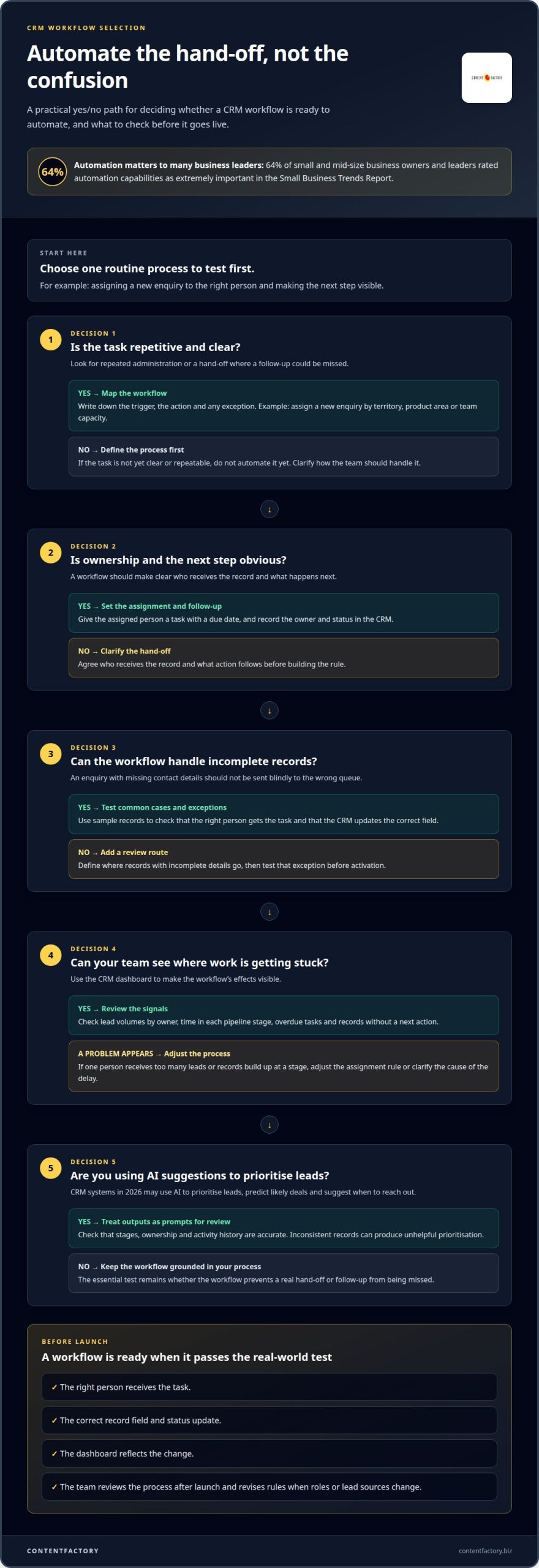
CRM automation should remove repetitive administration and make ownership clear. In the Small Business Trends Report, 64% of small and mid-size business owners and leaders rated automation capabilities as extremely important. The practical test is whether a workflow prevents a real hand-off or follow-up from being missed, not how many automation options appear in a feature list.
Start with one routine process, such as assigning a new enquiry. Set a rule based on territory, product area or team capacity, then define who receives the record and what happens next. For example, a Singapore business could route enquiries by local area or service line. The assigned person should receive a task with a due date, while the CRM records the owner and status.
Automated workflows can create reminders when a deal has had no recent activity, update a record after a status change or alert a manager when a lead remains unassigned. Keep the trigger, action and exception clear. If a lead has incomplete contact details, route it for review rather than letting an automated rule send it to the wrong queue.
Use analytics to check whether these workflows are working. A CRM dashboard can show lead volumes by owner, time in each pipeline stage, overdue tasks and records without a next action. Review the results with your team. If one person receives too many leads or records build up at a stage, adjust the assignment rule or clarify what is causing the delay.
In 2026, useful CRM systems use AI to prioritise leads, predict which deals are likely to close and suggest when to reach out. Treat these outputs as prompts for review, not a substitute for your team’s judgement. The underlying records need accurate stages, ownership and activity history; otherwise, prioritisation can reflect inconsistent data rather than useful patterns.
Automated emails can support operational hand-offs, such as notifying an account owner when a lead is assigned or reminding a colleague about a pending task. Keep these separate from marketing campaigns. For small and mid-sized B2B companies seeking senior marketing guidance to align their lead generation with sales pipelines, budgetboosters.eu offers fractional CMO services. For each notification, decide who receives it, what triggers it and whether it provides enough context to act without searching through several records.
Before activating a workflow, test it with sample records representing common cases and exceptions. Confirm that the right person receives the task, the CRM updates the correct field and the dashboard reflects the change. Then monitor the process after launch and revise rules when roles or lead sources change. If your team needs help aligning CRM workflows with its operating process, discuss your workflow requirements.
3. How CRM systems collect customer interaction data
A CRM builds customer records from interactions your team logs or connected systems capture. A record might include contact details, meeting notes, service requests, email history and follow-up dates. Its value comes from linking these events to the right person or organisation, not from collecting every possible detail.
Decide which interactions belong in each record. For a sales conversation, staff might log the date, participants, agreed next step and relevant product interest. A support exchange could include the issue, assigned owner, resolution and status. Clear categories help colleagues understand the relationship without reading a long, unstructured note.
Contact views should make useful customer data easy to find. Set up fields for details your team needs, such as account owner, last interaction, open request and next action. Avoid adding fields without a clear purpose. Inconsistent entries, duplicate contacts and outdated details can undermine dashboards and lead to poor decisions.
What Singapore PDPA requirements apply to storing customer data in a CRM? The Personal Data Protection Commission says organisations must meet obligations under Singapore’s Personal Data Protection Act, including accountability, appropriate protection, retention limitation and transfer limitation. For CRM use, establish why personal data is collected, notify individuals of relevant purposes, restrict access, protect records and remove data when it is no longer necessary to retain.
For practical governance, assign responsibility for CRM records and set access by role. A sales colleague may need account and opportunity details, while a support colleague may need case history. Review permissions when roles change and document how staff handle access or correction requests. The CRM can support these processes, but your organisation remains responsible for its data practices.
Customer support features can link service cases to the customer’s wider history. When a support colleague opens a record, they can see earlier requests, ownership and unresolved issues. That context helps the team make consistent decisions and spot recurring problems. A dashboard can also group cases by status or category, making backlogs easier to review.
Integrations affect which interactions appear automatically. A connected email system might associate correspondence with a contact, while a helpdesk connection can link support tickets. Set rules for matching records, handling duplicates and deciding which system is authoritative. Test common situations, such as a customer using two email addresses, before relying on automatic updates.
Keep data quality manageable with a simple review routine. Ask record owners to correct outdated details, close completed tasks and merge duplicates according to your organisation’s process. Check dashboards for blank fields or stalled cases, then refine field definitions or staff guidance. This keeps records useful for retention decisions without turning the CRM into an indiscriminate store of personal information.
4. CRM integrations with existing business systems
A CRM should connect customer records with tools your team already uses. Map each hand-off before choosing software. For example, identify where enquiries arrive, where customer details are stored and which system holds invoice information. This map shows which integrations will reduce manual entry and which connections are optional.
Email integration can associate messages with the right contact or organisation. If your team uses Google Workspace, assess whether the CRM connects with Gmail and calendars, and what information it synchronises. Check how it handles shared inboxes, multiple contacts at one organisation and messages that should remain private. A connection that captures the wrong correspondence creates noise rather than useful context.
List other tools that affect customer work. Accounting software can link customer records with finance activity, while WhatsApp may be a relevant communication channel for your team. For each connection, define which records need to move, the direction of updates and which system remains authoritative. This prevents staff from correcting the same information in two places.
Mobile access matters when colleagues update records away from their desks. A salesperson might record a meeting outcome after a client visit, or a manager might check an account before a call. Test these tasks on the devices your team uses. Check whether key fields, notes and follow-up actions are accessible, and whether updates appear in the main CRM record.
An open API can connect third-party applications and sync data with a CRM. It may help when a required tool lacks a ready-made connection, but it also brings configuration and maintenance work. Before building an API connection, define the data fields, update frequency, error handling and ownership. Start with one critical workflow, then test for missing fields and duplicate records.
How should a small business calculate CRM return on investment? Compare measurable benefits with total CRM costs over the same period. Include licences, implementation, migration, integrations and training, then measure changes such as time spent on manual updates or the number of follow-ups completed.
Use a simple review plan to link integration decisions to business results:
- Record the current steps for one workflow, such as converting an enquiry into an account.
- Identify manual data entry and delays between the CRM, email and accounting systems.
- After connection, compare the same workflow and track errors, completion time and reporting quality.
- Review whether mobile updates and synchronised records give staff the information they need.
Integration needs change as a business adds tools or alters processes. Review connections when a system becomes central to customer work, and remove those that create duplicate records or unnecessary steps. If you need to map system connections around your operating process, discuss your integration requirements.
5. CRM comparisons by team size and business needs
A practical CRM comparison starts with the team’s daily work, not an enterprise feature checklist. A suitable platform should support a three-person team and still perform as the business grows to 20 people. Small-business CRM software is also described for teams of 5 to 50 people, so assess user access and administration effort alongside capacity.
Look for contact and company records, a clear sales pipeline, task reminders, useful reporting and access controls. Add automation, mobile access and integrations only when they meet a defined need. For example, a team handling repeat service enquiries may value a clear history of customer requests more than advanced forecasting.
Team size affects who maintains the system and how records move between colleagues. In a three-person business, one owner may oversee setup and sales activity. At 20 people, colleagues may need separate roles, shared account visibility and consistent reports. Compare how each platform handles those changes without forcing every user into an unnecessarily complex workflow.
Business needs matter as much as headcount. A service business may need enquiry tracking, account history and follow-up tasks—an area where specialists like Growth Local assist by setting up structured lead generation and CRM workflows. A company with longer sales cycles may need deal ownership and forecasting. List the decisions the CRM must support, then compare platforms against those requirements rather than counting features.
Request demonstrations from two or three CRM vendors and use the same scenarios for each. Ask each vendor to show how a new enquiry becomes a contact, moves through the pipeline and appears in a manager’s report. Include an exception, such as a duplicate contact or reassigned account. This makes differences in usability and workflow easier to assess.
Use a scorecard after each demonstration. Compare ease of use, fit with current processes, reporting, user access and capacity to grow. Include the people who will enter and review records. Their feedback can show whether everyday tasks are clear or whether adoption may depend on workarounds.
Ask for relevant customer references when a platform becomes a serious contender. Discuss implementation, day-to-day administration and how the system handled team growth. Separate vendor claims from what your team can test directly, such as task creation, pipeline updates and report accuracy during a trial.
Keep the final decision practical. Remove platforms that miss essential requirements, then compare the remaining options against your scorecard and growth plans. Choosing a CRM for a small business should lead to a platform that fits today’s team without forcing a premature move to an enterprise system. If you need help assessing system fit and adoption requirements, Contact Us.
ContentFactory: Business process reengineering
ContentFactory helps you redesign business processes so a CRM supports clear responsibilities, practical workflows and useful information. Turn to business process reengineering when customer hand-offs are unclear, teams duplicate data entry or the system you select needs to fit improved processes.
The work examines how tasks move through your organisation, where delays or repeated steps occur, and how roles and information should be structured. This gives you a sounder basis for configuring CRM workflows around real operating needs, rather than reproducing inefficient steps in new software. Learn more about business process reengineering.
If you’re planning a CRM change or reviewing existing processes, contact ContentFactory to discuss your requirements.
Turn your CRM decision into an operating plan
Choosing a CRM for a small business is not the finish line. Next, decide who owns the system, how staff will use it and how your organisation will adapt as customer work changes. Treat adoption as an operational decision, not a software handover.
ContentFactory’s business process reengineering can help when existing responsibilities and workflows need redesigning before or alongside a CRM change. The focus is on aligning how work moves through your business with the systems that support it, so the technology reflects how your team needs to operate.
Bring your priorities, current process challenges and intended outcomes into the conversation. That gives you a practical starting point for deciding what needs to change and what should remain. Contact Us to book a 30-minute discovery call. A clear operating plan can help your CRM decision become a useful part of everyday work.
Frequently Asked Questions
What is CRM for small business?
A CRM is software that helps a business manage customer and prospect relationships in one shared system. It can link a contact to conversations, sales opportunities and service issues, giving colleagues a consistent view before they respond. For example, a new team member can review a customer’s previous enquiries instead of relying on a colleague’s inbox or memory.
How Do You Set Up and Manage a CRM System?
Start by defining the customer records, sales stages and responsibilities your team needs. Clean existing contact data before importing it, then set user access and configure only the fields and reports that support daily work. Test the setup with real scenarios, such as creating an enquiry and handing it to a colleague. Assign a system owner to review data quality and process changes.
How long does it take to choose and implement a CRM?
A structured CRM evaluation typically takes 4 to 8 weeks, while implementation for a small to mid-market business is estimated at 2 to 6 months. The total depends on data migration, integrations, workflow complexity and staff training. A focused project with straightforward records may require less configuration than one involving several systems and different team processes.
Is there a good free CRM?
Yes. A free CRM can suit a small team that needs basic contact records and deal tracking. Compare the plan’s user limits, storage, reporting and integration access with your actual needs. A free option may be a poor fit if a key function requires a paid tier. Use a trial to test a typical customer journey before adopting it.
What’s the average cost of a CRM for a 20-person company?
This is a calculation based on the per-user range, not a complete project budget. Implementation, data migration, integrations and training may add costs, so compare the full first-year requirements rather than licences alone.
How easy is it to set up and use a CRM with a small team?
A small team can keep setup manageable by agreeing on shared definitions for each pipeline stage and recording only useful customer details. For instance, decide what qualifies as an active opportunity before staff start entering deals. Keep the initial layout simple, then add fields or reports when a clear operational need arises. A named owner can resolve questions and maintain consistency.
What CRM integrations should a Singapore small business consider?
Prioritise integrations that reduce repeated entry in essential workflows. Accounting software can link customer and finance records; email and Google Workspace can provide correspondence and calendar context. Consider WhatsApp if your team uses it to communicate with customers. Before connecting tools, decide which system owns each record and what information should sync, then test for duplicate and incomplete entries.

Article by
Mayuresh Godse
Mayuresh Godse is a Singapore Certified Management Consultant and Business Strategist specializing in Sustainability, ESG, AI-driven Digital Transformation, and business growth. Based in Singapore, he writes about Sustainability, Digital Innovation, Business Strategy, and Content Marketing for global audiences.
Disclaimer
This article is provided by ContentFactory for general information only and is not legal, tax, accounting or financial advice. Regulations and government scheme criteria change; grant eligibility and quantum are set by the relevant Singapore agencies and assessed case by case, with no outcome guaranteed. Verify current requirements before acting.